
Explore how to use and keep your benefits
Congratulations on your new SafeLink service!
Take this opportunity to stay connected with your family, friends, and community. Don’t miss out on important
calls or appointments by keeping your phone on and with you wherever you go.
Plus, check the news and stream videos on your social media and more.

There are 3 important rules you must follow

Keep your phone on.
Make sure your phone remains ON to receive your benefits.

Use your phone.
Make a call, send a text, or use data (without Wi-Fi) at least once every 30 days.

Recertify yearly.
You must verify your eligibility for the SafeLink program once a year.


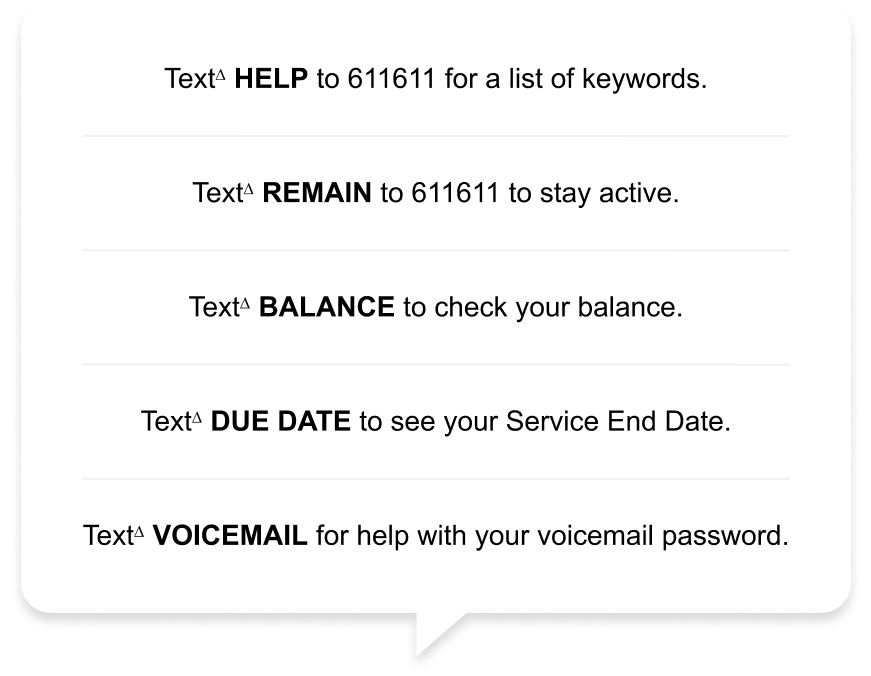
It only takes a text to get support
Use 611611 in these useful ways:
Your questions, answered
To view our unlocking policy, click here.
Wi-Fi Calling enables you to make and receive calls and send and receive messages over Wi-Fi . To enable this service, go to your phone's Settings, connect to Wi-Fi, enable Wi-Fi Calling and follow the instructions.
Yes! To find support and tutorials for your device, click here.

Need more benefits?
To help you get the most out of your service, we’re launching new paid add-ons.